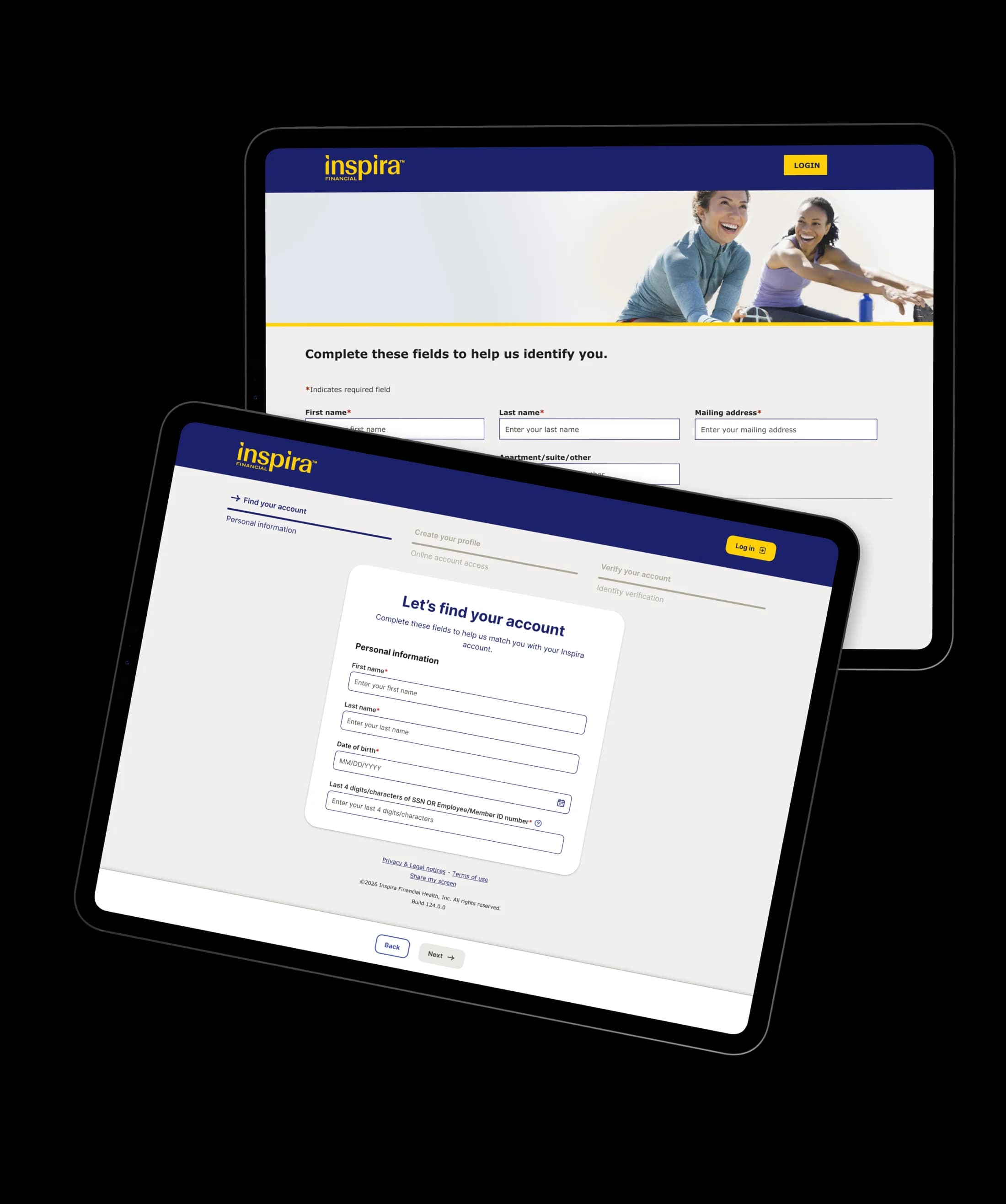
Redesigning the first impression
The onboarding flow had been untouched for years. I redesigned registration to reduce friction, improve completion, and align with our rebrand.
Flow at a glance
Registration is the first thing HSA and Emergency Savings Fund users see, so I treated it as a trust problem — not a visual refresh.
The redesign centered on one thing: get users from identity check to account access with fewer moments of doubt.
Why users were dropping
The registration flow hadn't been touched in years. No progress indicator, too many form fields, and a visual hierarchy that made every step feel equally important — which meant nothing felt important.
I rebuilt it around the rebrand with one goal: make the whole thing faster and less daunting.
Targets before design
I set targets before designing so there was a way to measure whether the redesign actually worked:
- Conversion — 20% increase in registration completion
- Speed — 25% reduction in time to complete
- Drop-off — 35% reduction in abandonment
Where users quit
Fullstory data and early sessions pointed to the same blockers:
-
No progress indicator. Users had no idea how many steps were left. That uncertainty alone was enough to make people quit.
-
14 required fields, most of them redundant. Account creation asked for username, password, confirmed password, email, confirmed email, phone number, mobile phone number, confirmed mobile phone number, three security questions, and three security answers. That's 14 inputs before a user can even start using the product.
-
Confirmation fields that solved the wrong problem. A "confirm your password" field doesn't give users confidence — it gives them extra work. Same goes for confirmed email and confirmed phone number.
What I changed
I rebuilt the flow around three principles from the data: show progress, reduce cognitive load, and remove anything that didn't need to exist.
Found accounts faster
I added a stepper, removed unnecessary fields, and updated the visual system to match the rebrand. The stepper answered the biggest blocker from the data: users quit when they can't see how many steps remain.
Cut account creation to 3 fields
This was the highest drop-off step. I audited every field and challenged whether it needed to exist:
- Confirmed password → removed. I replaced it with a password strength indicator and a show/hide toggle. One field that gives users more confidence than two ever did.
- Confirmed email → removed. No justification for keeping it.
- Three phone fields → one. The old form asked for phone number, mobile phone number, and confirmed mobile phone number separately. One mobile number is enough.
- Three security questions and answers → removed entirely. This was the biggest call. Security questions are a known vulnerability — answers like "mother's maiden name" are often publicly findable. Legal pushed back initially, but I presented the case: two-factor authentication and biometric login are stronger alternatives by every measure. They agreed.
I also surfaced the online service agreement in clear line-of-sight because it was a repeated friction point in testing.
Prevented debit-card confusion
Users need their debit card to continue, but the old flow warned them too late — after they'd already started account creation.
I moved the warning earlier and added a visual guide showing exactly where to find the required card details. Every participant in testing mentioned it without being asked. The one change that needed no explanation.
Reduced OTP friction
The original 2FA step used a single text field. I switched to segmented one-time-code inputs with auto-advance, because entering a 6-digit code in a single field is both slow and error-prone. Auto-advance also removes the last bit of busywork: users type six digits and the form moves on, with no field to tap or button to hunt for.
Kept long setup focused
The setup sequence is inherently long — I couldn't reduce it further without cutting required steps. I used a progressive accordion so completed steps collapse and the current step stays in focus. That kept visual noise low and reduced decision fatigue.
Validation in Lookback
I ran moderated and unmoderated sessions in Lookback after final designs.
Moderated sessions gave me live follow-up on confusion points. Unmoderated sessions gave me natural behavior at scale. I tested across different ages and digital comfort levels, tracking hesitation points, completion confidence, and flow clarity.
Results that mattered
- 32% faster completion time
- Lower abandonment through key registration steps
- Users across every age and comfort level preferred the new flow
That last one mattered most. The redesign didn't just work for people who are comfortable with technology — it worked for everyone.
What I learned
The fastest way to improve a form isn't making fields easier to fill. It's questioning whether each field needs to exist at all.
Every "confirmed" field is an admission that the original input didn't give users enough confidence. A password strength indicator and show/hide toggle does more in one field than a confirmation field ever did in two. Security questions aren't security — they're legacy theater that stuck around because no one had challenged them.
Fullstory made this concrete. Seeing exactly where users dropped off turned "the form feels long" into "these specific fields are the problem." When analytics and usability sessions point to the same root issues, decisions get faster and easier to defend.
Back To
Home